People and CRM
Real estate CRM for buying, selling and rental agencies
Keep every buyer, seller, tenant and landlord in one list. Each person has one record with details, notes, tasks, emails and a timeline.
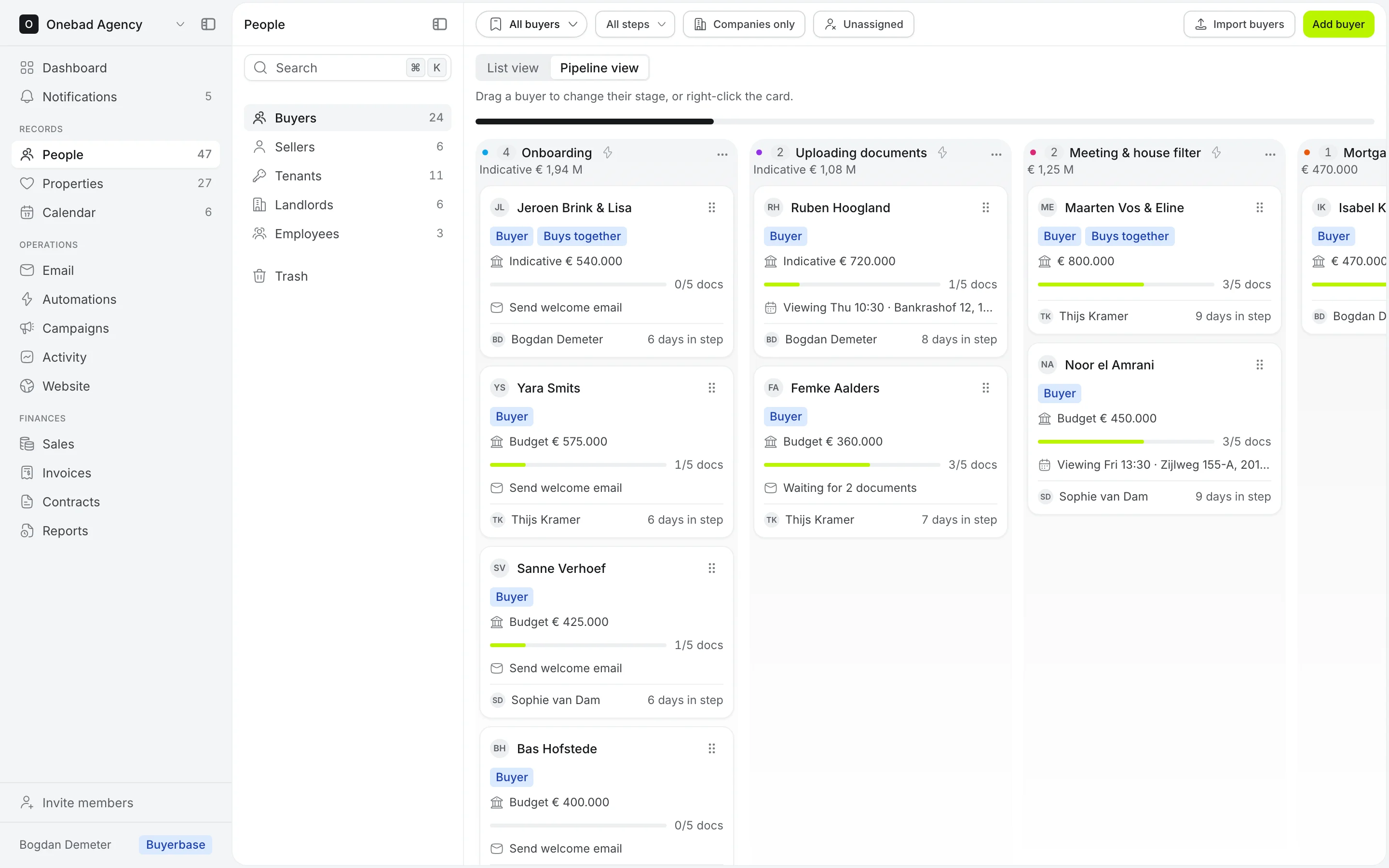
What a real estate CRM in Buyerbase holds
People are the centre of the app, and everything else hangs on a person's record.
Buyers, sellers, tenants, landlords
Every person carries one or more tags: Buyer, Seller, Tenant or Landlord. Each tag has its own tab and its own pipeline, and tags can be turned off in Settings.
One record per person
A buyer record has tabs for the overview, activity, emails, notes, tasks, files, invoices, houses, the deal and what the person needs to live in. You can add relations such as a partner, co-owner or representative, and mark a person as a company.
Search and filters
Search the list by name, email or phone, and filter by step, companies only or people without an agent. On the Buyers tab you can also filter by property type. The search at the top of the app finds people, properties and employees.
Saved views
Save the current filters, sort, columns and list or board mode as a view. Owners and admins can share a view with the team and set the default view.
Your own fields
Add fields in Settings: text, number, money, date, yes or no, single choice, multiple choice or link. Person fields follow the person's tags and work as columns and filters in the list.
Timeline and AI summary
The activity timeline lists notes, stage moves, tasks, viewings, emails and automation runs, with who did each. An AI paragraph on the record says where the person stands and what blocks the next step.
How it works
How to run your CRM day to day
- 01
Add or import people
Add a person with a tag and an agent. If the person already exists, Buyerbase says so and offers to add the tag instead. To move from your old system, an owner or admin imports a CSV file once and maps its columns.
- 02
Find and save a view
Search, filter and pick your columns, then save the result as a view. Switch the same list to a board when you want to see people by step.
- 03
Work from the record
Open a person to add a note or a task, change their step, and read their emails, files and houses. Every change lands on the activity timeline.
Who uses this real estate CRM
The same list serves agencies that buy, sell or rent out homes.
Buying agents
Buyers carry a pipeline from onboarding to contract signing. The record holds their search profile, mortgage estimate, documents, viewings and bids.
Selling agents
Sellers have their own steps: Onboarding, Meeting, Selling house, Bid won, Contract signed and Archived. A rule can move a seller to Selling house when a house they own is listed.
Property managers
Tenants and landlords each have their own pipeline. A rule can move a landlord to Tenant found when a tenant is assigned to their house.
Real estate CRM questionsShort answers.
Can I import my people from another CRM?
Can one person be a buyer and a seller?
Who sees which people in the CRM?
What does the AI summary on a record say?
Buyer pipeline
Buyer pipeline software for real estate agents
Every buyer on a board, from onboarding to contract signing, with stages that move on documents and bids.
Property database
Property database software for real estate agents
Every house on one record, as a list, cards or a board, with photos, fields and matching buyers.
Property matching
Property matching software for buying agents
Every listed house scored against every buyer, from saved criteria and what buyers like or pass on.
Start free today
Everything included, no card until your first sale. Or talk to sales and we will show you around.