Matching
Property matching software for buying agents
Buyerbase ranks each listed house against every buyer with a Buyer tag, using what the buyer asked for and what they liked or passed on, so you see who to call first.
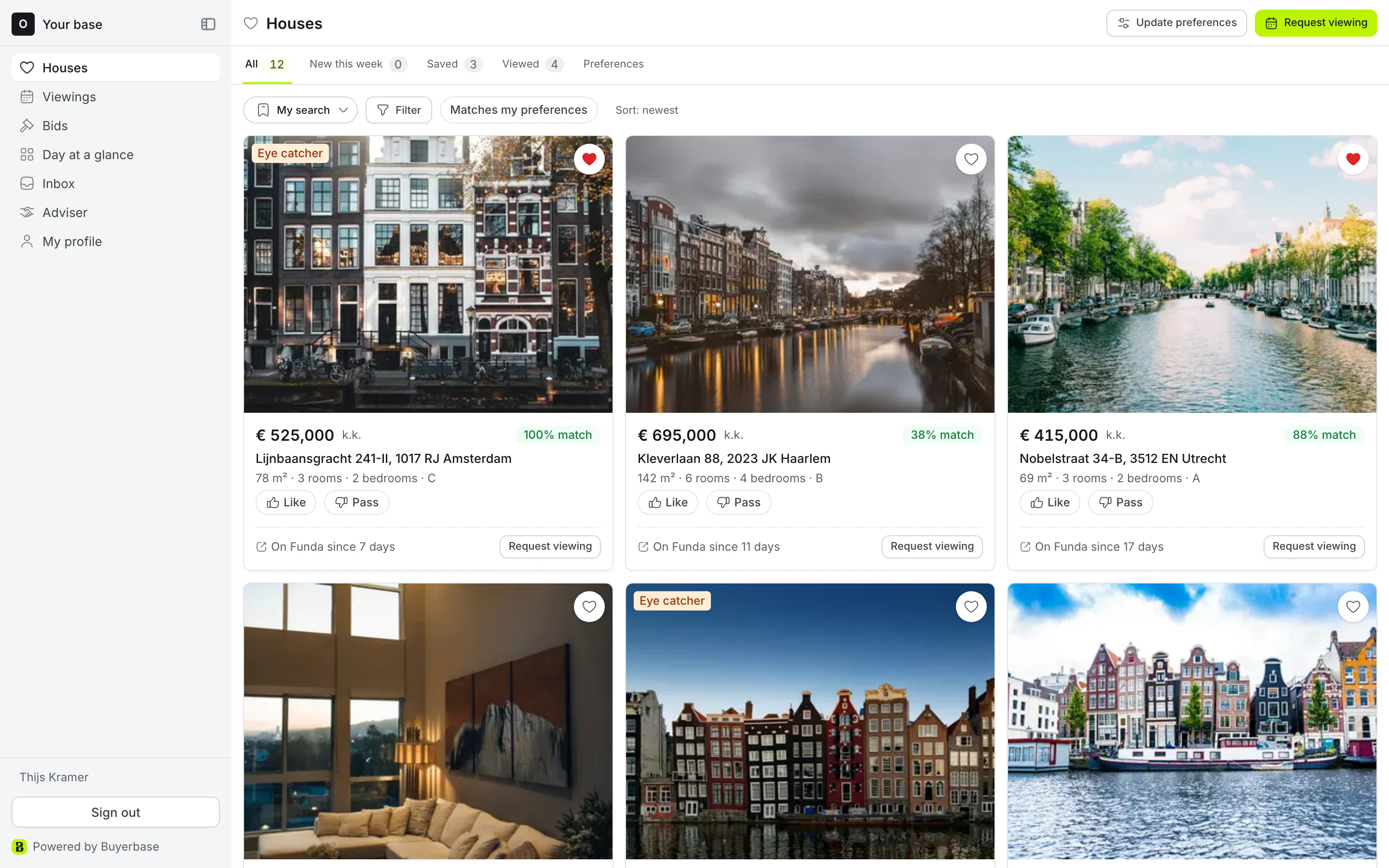
What property matching does in Buyerbase
A score from 0 to 100 for each listed house and buyer pair, updated when a house is listed, a buyer gets the Buyer tag, or a buyer likes or passes on a house.
A score for every pair
Each listed house for sale is scored against each buyer with a Buyer tag, from the criteria saved on the buyer: budget, property type, bedrooms, bathrooms and areas. A buyer who fits scores higher than one who does not.
Likes and passes move the score
When a buyer likes or passes on a house, houses of the same type or in the same neighbourhood score a little higher or lower for that buyer. The criteria stay more important than the history.
The matches inbox
The Matches screen lists every buyer and house pair that scores 60% or higher, best first, with links to the buyer and the house. Open it from the Properties list.
Matching buyers on each house
A property record lists the buyers who fit that house, with their match percent. Add a buyer to the shortlist from the same list.
Top matches on each buyer
A buyer record has a Top matches card with the best scored houses, their price and the match percent. Next to it, a card shows the reasons the buyer passes on most.
Saved searches in the portal
A buyer can keep up to three named searches in the portal. A house counts as a match if it fits any active search, and the match percent in the portal follows that rule.
How it works
How property matching works
- 01
Save what the buyer wants
Enter the criteria on the buyer record. Buyers need the Buyer tag to be matched.
- 02
Houses are scored when they are listed
When you mark a house as listed, Buyerbase scores it against every buyer of your agency. A like or a pass in the portal rescores the houses for that buyer.
- 03
Review and follow up
Open the Matches screen or a property record, add a buyer to the shortlist and schedule a viewing. A colleague who adds a house that scores 80% or more for your buyer sends you a notification.
Who uses property matching
It supports the people who find houses for buyers and the buyers who look at them.
Buying agents
See which buyers a new house suits and which houses suit one buyer, without going through every search by hand.
Agency teams
Colleagues share one inbox of strong matches, and a buyer's assigned employee is notified when a colleague adds a house that scores 80% or more.
Buyers in the portal
Buyers see houses with a match percent, can sort by best match, and like or pass on a house with an optional reason.
Property matching questionsShort answers.
How does Buyerbase match houses to buyers?
Does property matching use likes and passes?
How many searches can a buyer save?
Which houses are matched to buyers?
Viewing scheduling
Viewing scheduling software for real estate agents
Plan viewings in one agency calendar, remind buyers and file a report after each visit.
Bids and closing
Bid management software for Dutch buying agents
Log bids per house, share a koperspakket with consent and follow every deadline to the notary.
Contracts and e-signing
Contract e-signing for real estate agents
Write contract templates, send them to several signers and let buyers sign in their portal.
Start free today
Everything included, no card until your first sale. Or talk to sales and we will show you around.