Properties
Property database software for real estate agents
One record for every house you handle: details, photos, documents, owner and matching buyers. Work in a list, as cards or on a board.
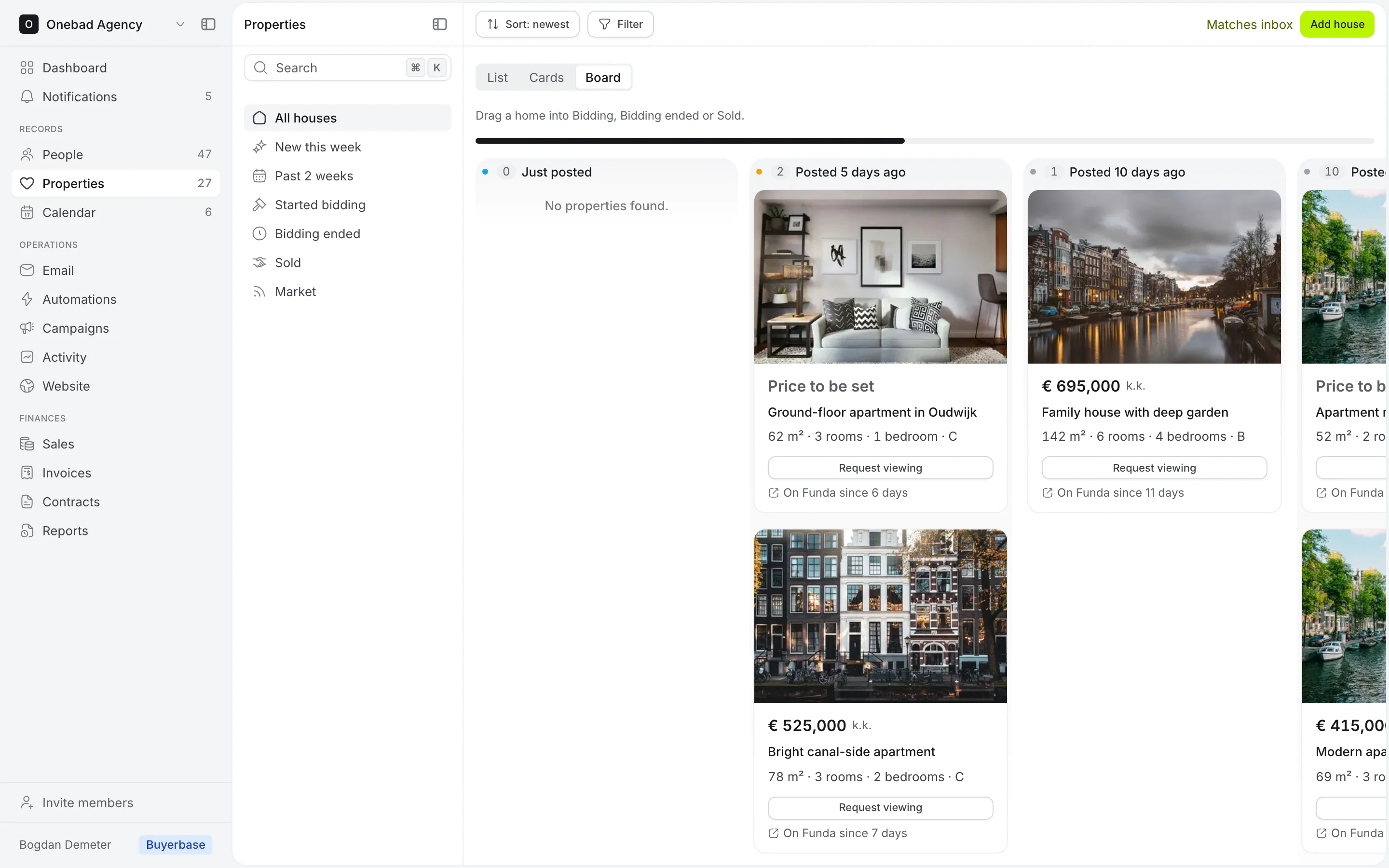
What a property database in Buyerbase holds
Each house has one record that your team works from, and buyers see their own version in the portal.
House fields that fit the Dutch market
Title, address, type, asking price, bedrooms, bathrooms, rooms, living area, plot area, build year, energy label, outside space and neighbourhood. Add a description and location notes.
Photos and brochures
Add up to 50 photos per house, up to 10 MB each, in JPEG, PNG or WebP. Drag to reorder, pick the main photo and describe each one. Attach a PDF brochure of up to 50 MB.
Houses not yet on Funda
Show a house to your own clients only and set the date it is expected to go public. Your buyers see it first, tagged Not on Funda yet. The tag drops when a public link is added or the date passes.
A property board with stages
Switch the list to a board with seven lanes, from Just posted to Sold. Drag a house into Bidding, Bidding ended or Sold. If an automation sends buyers a message for that move, you confirm first.
Your own fields and labels
In Settings, Fields, add your own home fields: text, number, money, date, yes or no, single or multiple choice, and link. Show them as columns and filter on them. Owners and admins can add labels to a house.
Filters and saved views
Search by title, address or neighbourhood. Filter by status, type, price, area, for sale or for rent, and archived. Save the filters, sort, columns and list or board mode as a view for yourself or your team.
How it works
How to build your property database
- 01
Add the house
Choose Add house, fill in the details and link the owner or landlord. You can also move your existing homes over once with the import.
- 02
Complete the record
Add photos, a brochure and documents, choose which documents buyers can download, and fill in your own fields. The record shows the address on a map when the map is available.
- 03
Work the house
The record lists the buyers who fit the house, with their match percent. Add them to a shortlist, schedule a viewing, log bids and share the link with colleagues.
Who uses the property database
Agencies that buy, sell or let homes use the same Properties screen.
Buying agents
Add the houses you find for buyers, see which buyers each one fits and let buyers see them in their own portal.
Selling agents
Keep the details, photos, brochure, owner and bids of each listing on one record, and decide whether your own clients see it first.
Property managers
Mark a home as for rent, link its landlord and keep the rental on the same record as the house.
Property database questionsShort answers.
What is a property database for real estate agents?
Can I see my houses on a board?
How do I add a house to Buyerbase?
Can I add my own fields to a house?
Property matching
Property matching software for buying agents
Every listed house scored against every buyer, from saved criteria and what buyers like or pass on.
Viewing scheduling
Viewing scheduling software for real estate agents
Plan viewings in one agency calendar, remind buyers and file a report after each visit.
Bids and closing
Bid management software for Dutch buying agents
Log bids per house, share a koperspakket with consent and follow every deadline to the notary.
Start free today
Everything included, no card until your first sale. Or talk to sales and we will show you around.