Lead generation
Real estate lead generation and capture
Buyerbase does not run or pay for your ads. It reads your Meta campaigns and receives the leads from Meta, Google Ads and your website as people in your CRM.
Lead capture for real estate agencies
Connect your own accounts, tag your campaigns and every lead arrives as a person.
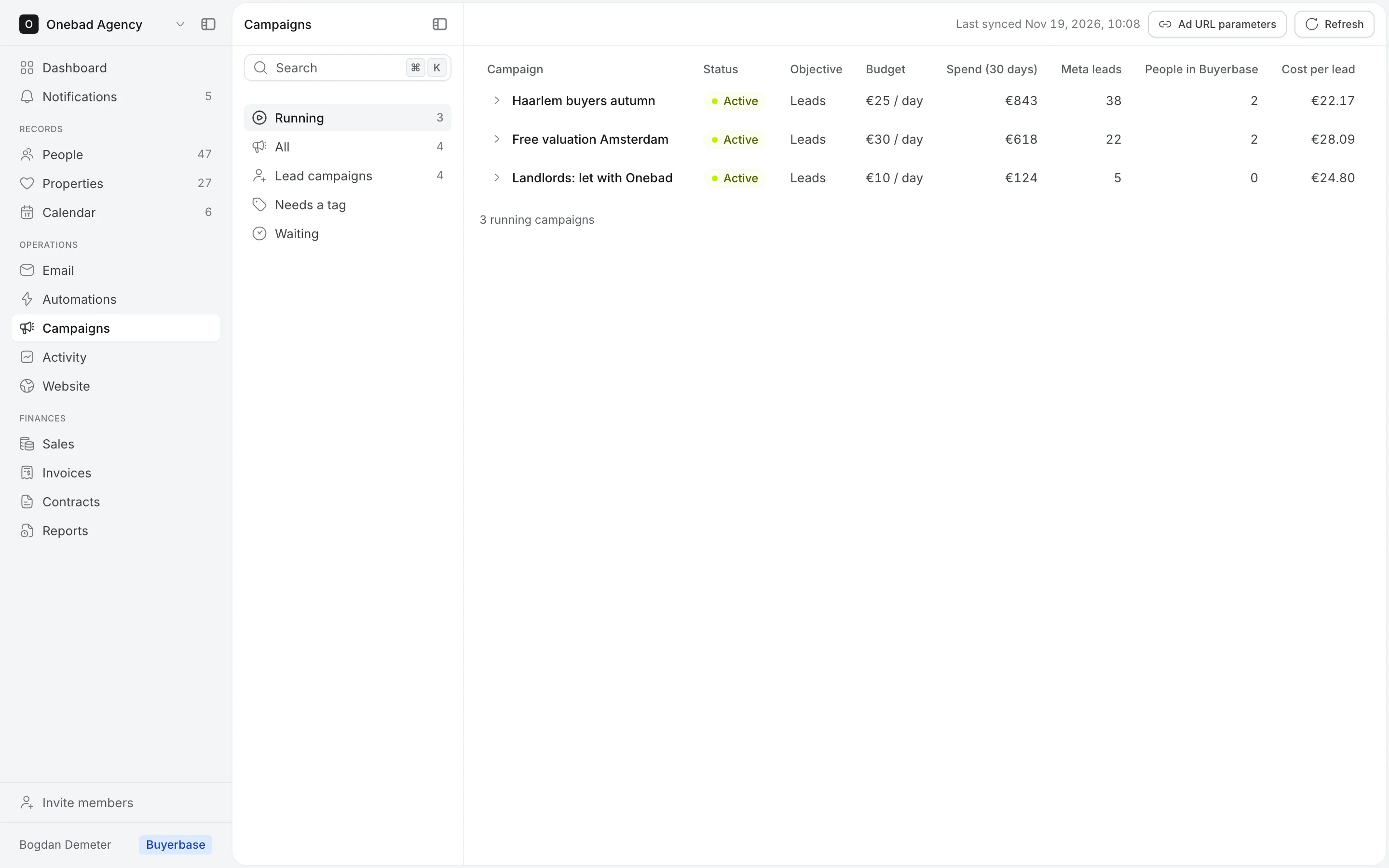
Meta campaigns in one list
Connect your own Meta business, then pick the ad accounts to read and the Pages that send you leads. The Campaigns page under Insights shows each campaign with its status, budget, spend over 30 days, Meta leads, people in Buyerbase and cost per lead.
Lead Ads leads as people
A lead from a Meta Lead Ad arrives as a person with its name, email, phone and the form's answers in the notes. It lands unassigned, a buyer in the first step of the buyer pipeline, and Buyerbase emails your agency.
A tag per campaign or ad
Give a campaign or a single ad a tag, such as Buyer or Seller. Leads from it land with that tag, the ad's tag wins over the campaign's, and the box These are companies marks company leads.
Held and earlier leads
A lead from an ad without a tag is held until you tag it, then it enters the right pipeline. Bring in earlier leads fetches the ones Meta still keeps, up to 90 days, from the Pages you picked.
Google Ads lead form leads
Create a key under Apps in Settings and paste the webhook address and the key into your own Google Ads lead form. Each lead lands as a buyer, and a test lead confirms the link without adding anyone to People.
WhatsApp first reply
Connect your own WhatsApp Business number and an approved template. Buyerbase then prepares a first reply for each new lead with a phone number, which you send or skip, or it sends the reply automatically.
How it works
How lead generation works in Buyerbase
- 01
Connect your own accounts
In Settings, under Apps, connect your Meta business and pick the ad accounts and Pages. For Google Ads, create a key and paste it into your lead form.
- 02
Tag your campaigns
On the Campaigns page, give each campaign or ad a tag. Paste the ad URL parameters Buyerbase gives you into each ad in Meta, so leads are counted under their campaign.
- 03
Follow up on the people
Each new lead is a person with its source, such as Meta ads or Google Ads, on the record. Buyerbase asks the agency to assign it, and you send the WhatsApp first reply from the person's record.
Who uses lead generation in Buyerbase
Agencies that advertise, and agencies that wait for visitors on their own website.
Agencies running Meta ads
Owners and admins see campaigns, spend and leads in one place and choose the tag of each ad. Agents work the leads that arrive as people.
Agencies running Google Ads
Leads from the lead forms of your own Google Ads account arrive as buyers, and your agency gets an email for each new one.
Agencies with their own website
Add the Find your home with us widget to your own site, on the domains you register, or use the forms of your Buyerbase website. An enquiry lands as a new person or on the matching one.
Lead generation questionsShort answers.
Does Buyerbase run my Meta or Google ads?
Can I get Meta Lead Ads leads into my real estate CRM?
What happens when a lead is already in Buyerbase?
What does the WhatsApp first reply need?
Agency website
Real estate agency website builder
Your agency's own website with an editor, an AI builder and forms that create people in the CRM.
Client portal
White-label client portal for real estate agents
A portal with your logo and colours where clients see houses, viewings and documents, in Dutch or English.
Reports and sales
Reporting software for real estate agencies
Reports on closings, revenue, pipeline speed and lead sources, with CSV export and sales per employee.
Start free today
Everything included, no card until your first sale. Or talk to sales and we will show you around.