Agency website
Real estate agency website builder
Start from a ready-made site filled with your own details, edit it or ask Bas for changes, and let every enquiry arrive in your CRM, as a new person or on the person it matches.
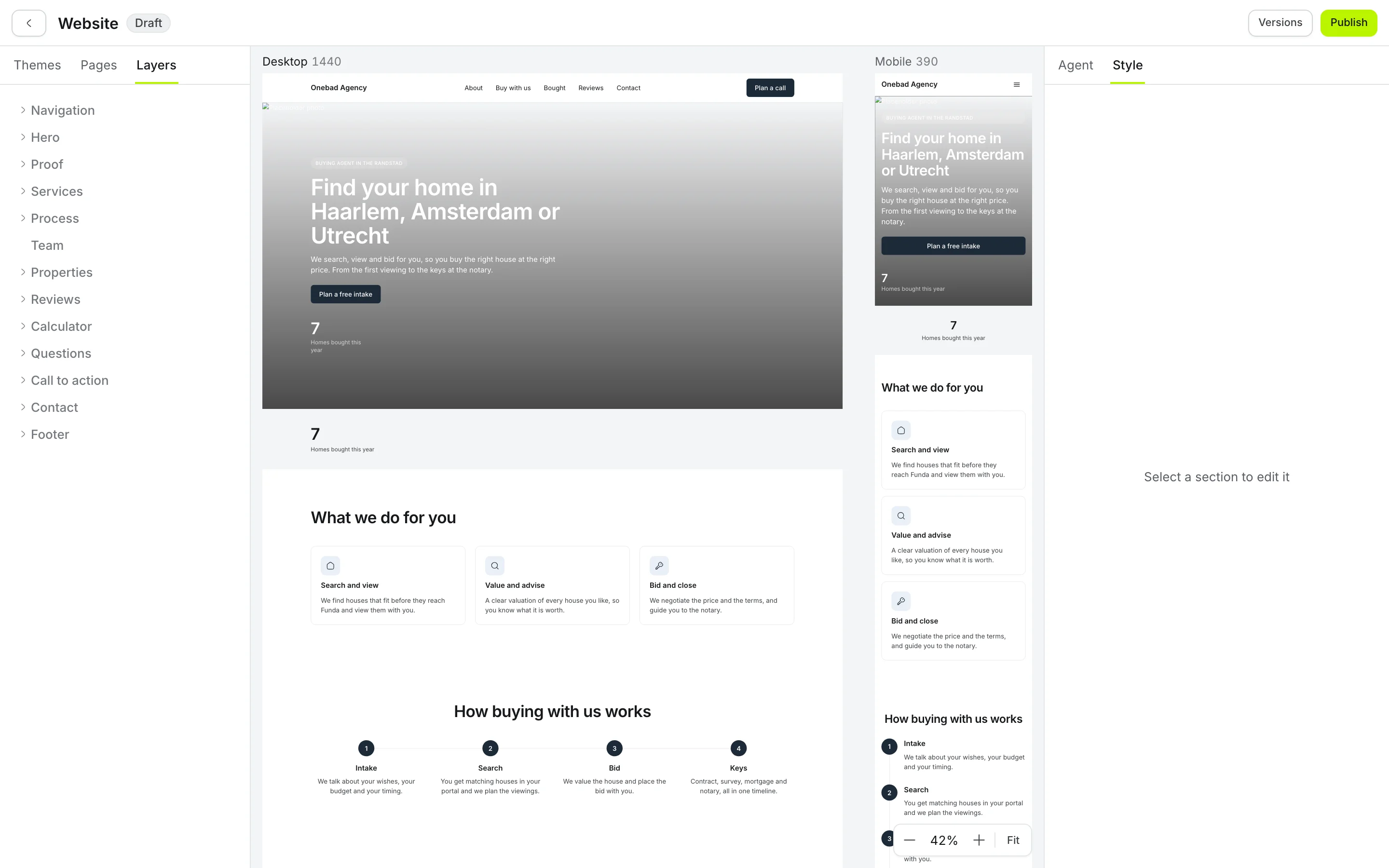
Everything a real estate website needs
One site, built from your agency data and connected to the people in Buyerbase.
A ready-made site of nine pages
Start with nine pages filled in with your own details: home, about us, buying with us, bought homes, reviews, contact and the privacy, cookie and terms pages. You change everything in the editor.
A visual editor
Select a section in the preview to change its text, photos, buttons and layout. Add, move or duplicate sections, hide a section on a phone, check the desktop and phone width, and restore an earlier version.
AI builder with proposals
Generate your pages from your business profile, or ask Bas for a change on the page you are on. Bas shows each change before and after, and nothing is applied until you confirm it.
Fact check, SEO and translation
A fact check removes figures, euro amounts, phone numbers and names that are not in your agency's data. Bas also writes search titles, alt texts and the Dutch or English version as proposals you edit row by row.
House search and house pages
Homes you mark as shown appear on a search page, filtered on price, bedrooms, living area and sale or rent. Each has its own house page with photos, key facts and an enquiry form.
Forms and landing pages
Contact, call back, valuation, rental and house forms create a person in Buyerbase with their source. On a landing page you choose the tag, and a label, that every lead from its form gets.
How it works
How the agency website works
- 01
Start from your agency data
Open Website in Settings and start the site. It uses your agency details, your team, your reviews and your fee, so the first draft is already yours.
- 02
Edit by hand or with Bas
Change sections yourself, or generate pages and ask Bas for changes. Each confirmed change saves a version you can restore.
- 03
Publish on your own address
Publish to a buyerbase.site address, or connect your own domain by creating the DNS records at your domain provider, once the app shows the domain is available to your agency. Buyerbase checks the connection for you.
Who the agency website is for
Agencies that want a website without a separate tool or developer.
Buying agents
Show your fee model, your team, reviews and the homes you bought for clients. A sale appears only when you switch it on.
Selling agents and property managers
Show homes for sale or for rent on a house search with a page per house. An enquiry from a house page becomes a buyer, or a tenant for a home to rent.
Owners and admins
Owners and admins edit the website. A team member appears on it only after they switch on Show me on the website.
Agency website questionsShort answers.
Can I build a real estate agency website without a developer?
Does the AI builder make up facts about my agency?
Can I use my own domain for my agency website?
Do website enquiries end up in the CRM?
Client portal
White-label client portal for real estate agents
A portal with your logo and colours where clients see houses, viewings and documents, in Dutch or English.
Reports and sales
Reporting software for real estate agencies
Reports on closings, revenue, pipeline speed and lead sources, with CSV export and sales per employee.
Data import
Real estate CRM import from Kolibri, Yes-co and Realworks
Move your people from Kolibri, Yes-co, Realworks, HubSpot, Pipedrive or a CSV file, once.
Start free today
Everything included, no card until your first sale. Or talk to sales and we will show you around.