Reporting
Reporting software for real estate agencies
Owners get reports on closings, revenue per employee, time in stage and conversion by source. Every employee gets a page with their own results.
What your real estate reports show
Five reports on the Reports screen, each for the date range you pick.
Closings report
Every bid marked won in the range, dated by the purchase agreement date. Each row shows the buyer, the property, the employee and the amount.
Revenue per employee
Fee invoices paid in the range, grouped by employee, with the number of invoices and the revenue per person.
Funnel and time in stage
The funnel shows how many people entered each pipeline step and how many got at least that far. Time in stage shows the average days people spent in each step, under the names your agency gave its steps.
Conversion by source
People grouped by lead source, with how many converted and the conversion percentage, so you can see which sources bring clients that close.
Sales overview
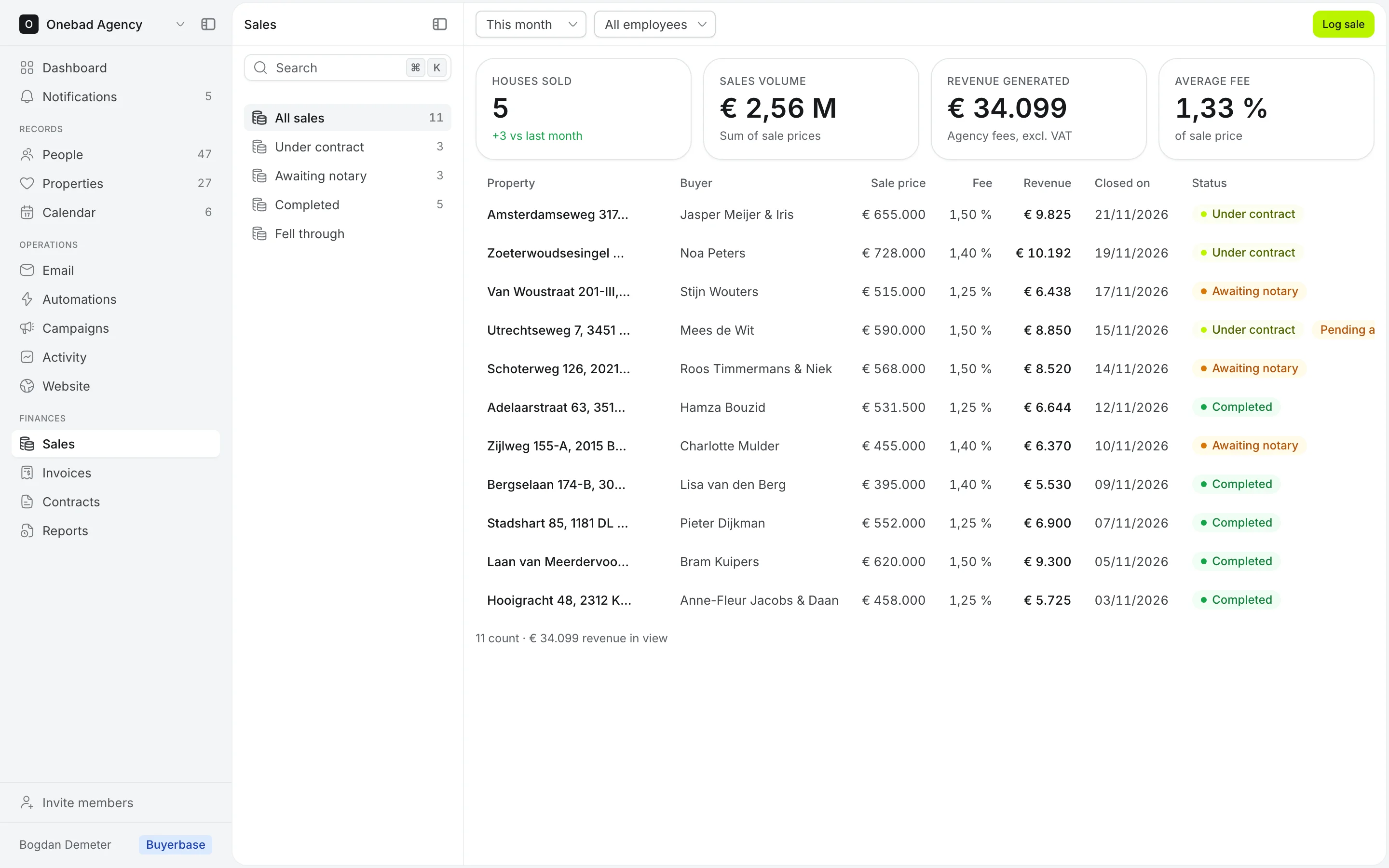
The Sales screen lists every logged sale with price, fee, revenue and status. It shows houses sold, sales volume, revenue and average fee for a period you pick, and you can filter by employee.
CSV export
Each report has an Export CSV button for the range on screen. Every export is recorded in the agency audit log.
How it works
How reporting works
- 01
Pick a report and a date range
Choose a report in the list on the left, then set From and To and press Apply. The range starts at the last 90 days.
- 02
Read the table
The report opens as a table with the numbers in columns. A report reads up to 20,000 records, and a note tells you if it stopped there.
- 03
Export or switch reports
Switch to another report and your dates stay as you set them. Or export the table to CSV for a spreadsheet.
Who uses real estate reports
Owners and admins see the whole agency, and each employee sees their own results.
Owners and admins
They open Reports, Sales and the team activity log. An employee record shows revenue this year against the target, houses sold, revenue per month and the employee's sales.
Employees
My performance shows an employee's own revenue against their target, houses sold, people created, their sales and their rank in the team. They can download a statement of their sales as CSV.
Agencies with more than buyers
The funnel, time in stage and conversion by source can be switched between buyers, sellers, tenants and landlords, for the kinds of people your agency has switched on.
Questions about reportingShort answers.
Can I export real estate agency reports to CSV?
Can I see revenue per employee?
Who can see the reports?
Can I report on sellers, tenants and landlords too?
Data import
Real estate CRM import from Kolibri, Yes-co and Realworks
Move your people from Kolibri, Yes-co, Realworks, HubSpot, Pipedrive or a CSV file, once.
Integrations and API
Real estate CRM integrations: mail, calendar, ads and API
Connect your own mailbox, calendar, WhatsApp, ads accounts and Stripe, or use the API and MCP.
White-label branding
White-label CRM for real estate agencies
Your logo, colour, name and own web address in the app, the buyer portal and the emails to buyers.
Start free today
Everything included, no card until your first sale. Or talk to sales and we will show you around.