AI assistant
AI assistant for real estate agents that knows your data
Ask Bas answers questions about your people, homes and viewings, and proposes changes as cards you confirm. Most changes can be undone, and the card says what cannot.
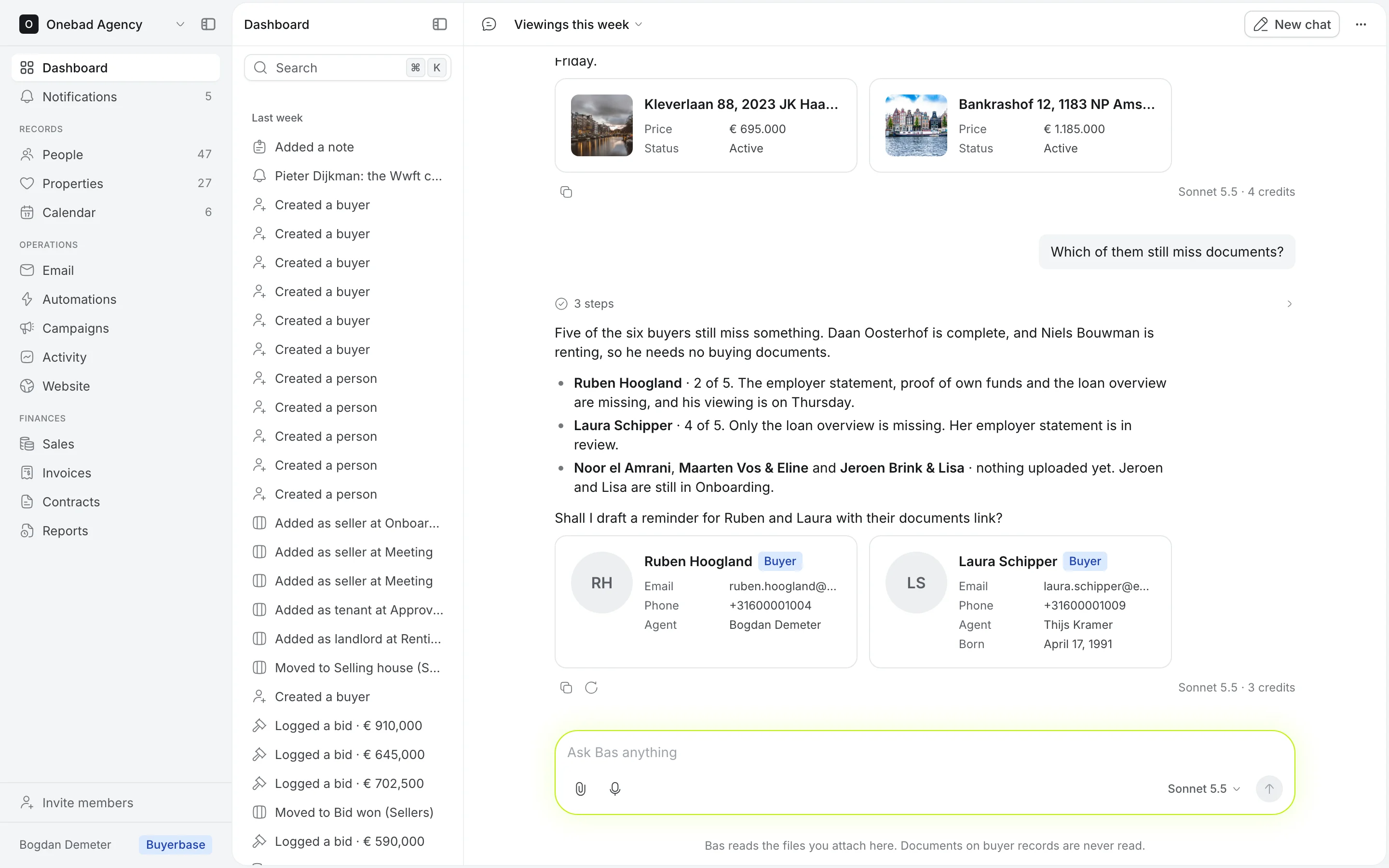
What the AI assistant for real estate agents does
Bas reads what you are allowed to see and prepares the work, and you decide what is saved.
Answers from your own data
Ask about people, homes, viewings, tasks, notes, bids, sales and recent activity. Bas looks it up in your workspace and answers with what it finds.
Changes as cards you confirm
Bas can propose a task, a note, a logged call, a stage move, a viewing, saved homes, a bid or a sale. Nothing changes until you confirm the card, and the card says what happens next, such as which buyer gets an email.
Undo and Reverse
A change you confirmed can be undone from the card. Later it can be reversed from the person's Activity, which shows that Bas made it and who confirmed it.
Brochures from PDFs
Attach a property's PDFs in the chat. Bas writes a page about each house document with its sources, adds the documents whole as an appendix, and binds one PDF you can preview, download or add to the property.
Valuation and bid advice
On a property, Bas shows a value range built from the WOZ value, your own sold houses and nearby asking prices. It can then create bid advice with a band to bid between.
Descriptions and contract checks
Write with Bas writes, rewrites or translates a house description in English and Dutch. Check purchase contract reads a contract PDF and lists the points to look at, as a checklist and not legal advice.
How it works
How to work with an AI assistant in Buyerbase
- 01
Ask in plain language
Open Ask Bas from the header button, the side panel or the full chat page. Type a question or pick a suggestion.
- 02
Check the card
For a change, Bas shows a card with the details and what it sets off. Confirm it or deny it. For an email, Bas shows a draft in the person's language that you copy or send after you confirm.
- 03
Undo when needed
Use Undo on the card, or Reverse in the person's Activity. You are shown what the reversal does before it runs.
Who uses an AI assistant at a real estate agency
Ask Bas is for the whole team, and each member sees only what their role allows.
Buying agents
Ask which buyers have gone quiet or who needs a follow-up today, and find a buyer for a new property. Log calls and notes, plan viewings and record bids from the chat.
Selling agents and property managers
Selling agents get value ranges, bid advice, house descriptions and brochures. Property managers can look up tenants and landlords and draft emails in their language.
Owners and admins
Set shared context and prompts for the agency, choose which models members may use, and turn AI off for the whole workspace. Owners and admins can also import a CSV file through the chat.
AI assistant for real estate agents: questionsShort answers.
Can an AI assistant change my CRM data without asking?
Which data can Ask Bas see?
Can Ask Bas write emails for me?
Can my agency switch the AI off?
Lead generation
Real estate lead generation and capture
See your Meta campaigns and bring ad, form and website leads into Buyerbase as people.
Agency website
Real estate agency website builder
Your agency's own website with an editor, an AI builder and forms that create people in the CRM.
Client portal
White-label client portal for real estate agents
A portal with your logo and colours where clients see houses, viewings and documents, in Dutch or English.
Start free today
Everything included, no card until your first sale. Or talk to sales and we will show you around.