Documents
Document management for real estate agents
Buyers upload what you ask for in their portal. You approve or reject each file, and every time a file is opened it is recorded.
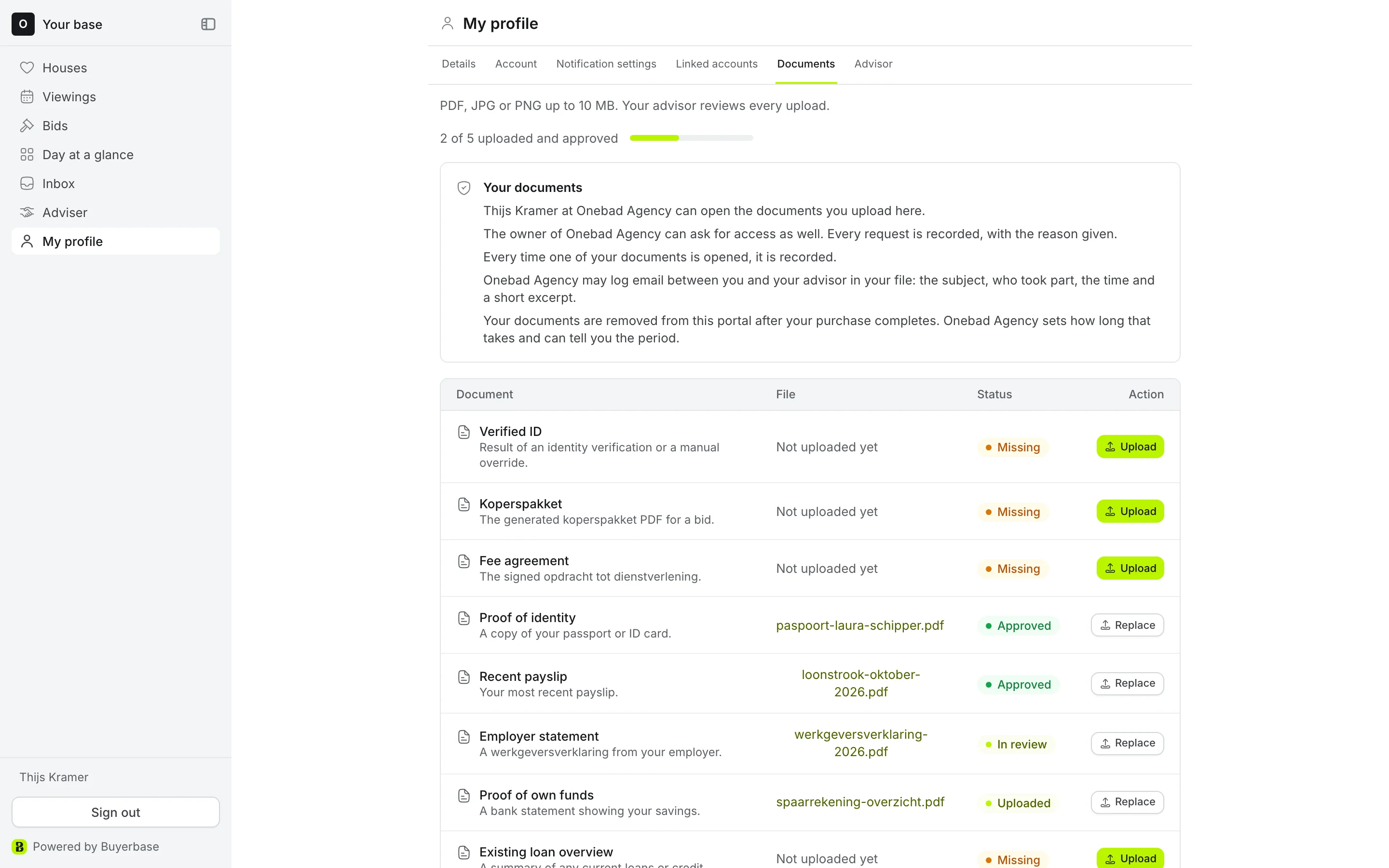
What document management covers
Documents sit on the buyer record and in the buyer's portal, with a status for each file.
Documents in the portal
The buyer sees the documents you asked for and uploads a PDF, JPG or PNG of up to 10 MB, or takes a photo on a phone. A file can be replaced later.
Documents on the buyer record
The record lists each document with its type, file name, status and upload date, and you open the file from there. The assigned employee is notified when a buyer uploads or replaces a document.
Approve or reject
Approve a document, or reject it with a reason the buyer can read. The buyer gets an email with the decision and can upload a new file. The portal counts how many required documents are uploaded and approved.
Access for the assigned employee
A buyer's documents are visible to the employee the buyer is assigned to and to members who may see every buyer's file. The owner can request one hour of access, with a written reason of at least 20 characters.
Access log
Each time a document is opened or downloaded it is recorded with the file and the time. Everyone at the agency can read the log in Settings, Privacy, and the buyer sees each opening of their documents in the portal.
Data requests and deletion
A buyer can download a copy of their data from the portal, or ask for their account to be deleted. The request lands in Settings, Privacy, where an owner or admin processes it or refuses it with a legal reason.
How it works
How document management works
- 01
The buyer uploads
In the portal, under My documents, the buyer uploads each document you asked for. The assigned employee gets a notification.
- 02
You review each file
Open the file from the buyer record and approve it, or reject it with a reason. The buyer gets an email with your decision.
- 03
You see what was opened
Check Settings, Privacy to see which document was opened and when. When someone without access needs a file, the owner can request access with a reason.
Who uses document management
Buyers who send paperwork, and the agency staff who review it.
Buyers and their files
Buyers upload documents, see the status of each one and the reason for a rejection, download a copy of their data and can ask for their account to be deleted.
Employees and owners
The assigned employee reviews documents, and the owner can request access for a limited time. An owner or admin processes deletion requests within the 30 days the request allows.
Selling agents and property managers
On a seller's record the agency uploads files such as the deed of ownership, the energy label and the VvE papers. On a tenant's record it uploads the ID, payslips, the employer's statement and the previous landlord's statement, and approves or rejects them.
Document management questionsShort answers.
Can buyers upload documents themselves?
Who can see a buyer's documents?
Where are buyer documents stored?
Can a buyer ask for their data or have their account deleted?
Tasks and follow-up
Task management for real estate agents
Tasks per person or house with an owner and a due date, standard tasks per stage and a My day list.
Email in the CRM
Email CRM for real estate agents with your own mailbox
Connect your Outlook mailbox, send and read email in Buyerbase, and see each conversation on the record. Gmail follows after Google's security review.
Workflow automations
Real estate workflow automation for agencies
Send emails, WhatsApp and push, create tasks and notify the team when a person reaches a stage.
Start free today
Everything included, no card until your first sale. Or talk to sales and we will show you around.